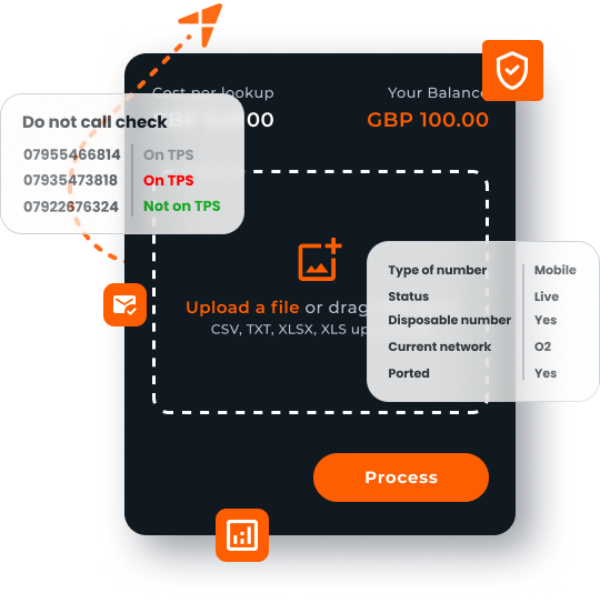
How HLR Lookup Helps Verify Active Mobile Numbers Before SMS Delivery
HLR Lookup helps telecoms, messaging and technical teams check mobile number status before relying on a number for SMS delivery, routing, onboarding, validation or customer communication.
A mobile number can pass a basic format check and still be inactive, unreachable, disconnected or unsuitable for communication. That creates risk for teams handling high-volume SMS delivery, customer contact data, routing logic, onboarding workflows or API-based validation.
With HLR Lookup, users can run an HLR check to understand more about the mobile number they are about to use. This supports better decisions before sending messages, processing traffic, importing customer data or validating numbers in bulk.
For telecoms professionals and developers, HLR Lookup is not just a way to check if a phone number is valid in format. It is a practical tool for active mobile number verification, mobile network lookup and phone number data quality.
Use your free credits to run an HLR check and test a sample of numbers before your next SMS delivery, routing decision or validation workflow.
What is HLR Lookup?
HLR Lookup is a mobile number validation and number intelligence service that helps users query network-level information about a mobile number.
An HLR check can help identify the status and characteristics of a mobile number, including whether it appears active, inactive or invalid, and which mobile network or operator may be associated with it.
For telecoms teams, SMS providers, CPaaS platforms and developers, this information can be used before sending messages, routing traffic, importing customer records or integrating number validation into a platform.
HLR Lookup can support single lookups, bulk mobile number validation and API-based workflows through the HLR Lookup API.
How does HLR Lookup help verify active mobile numbers?
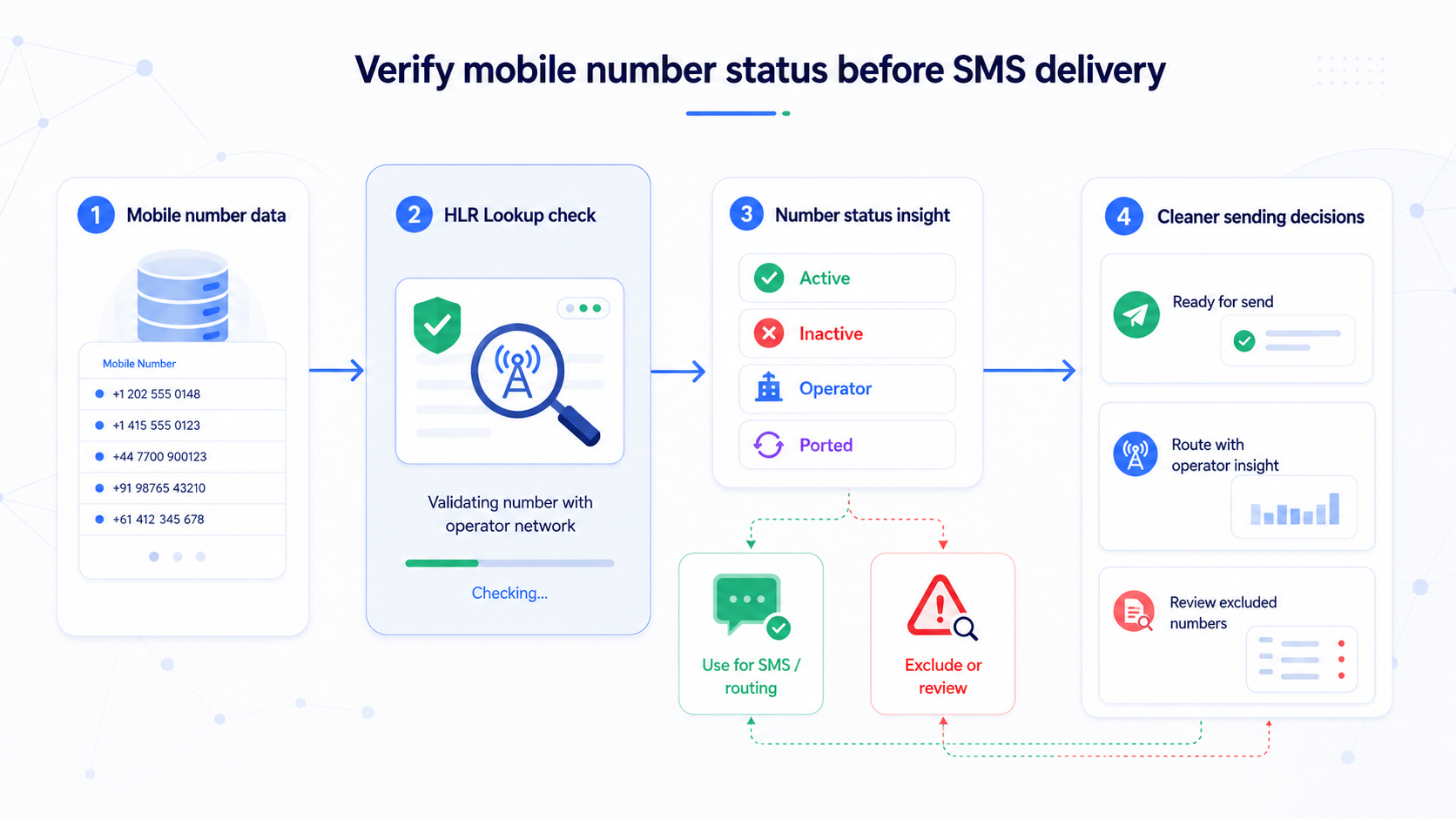
HLR Lookup helps verify active mobile numbers by checking mobile number status at a deeper level than basic format validation.
A format check can tell you whether a number looks structurally correct. For example, it may confirm that the number has the right length, country code or numbering pattern. But it does not confirm whether the number is active on a mobile network.
An HLR check can help provide more useful operational information, such as whether the number appears reachable, inactive, invalid or associated with a specific mobile operator.
This makes HLR Lookup useful before:
SMS delivery
SMS routing
Customer onboarding
Number validation API workflows
Bulk mobile number validation
CRM data cleansing
Processing old or third-party mobile datasets
Check mobile number status before SMS delivery so your team is not relying only on whether a number looks correct.
Why active mobile number verification matters
Inactive mobile numbers create operational and commercial problems across telecoms, messaging and customer data workflows.
For SMS providers and aggregators, sending to inactive mobile numbers can mean unnecessary send attempts, poorer routing decisions and less reliable campaign or notification performance. For developers, poor number data can affect onboarding, account verification, authentication flows and customer communication logic.
For CRM and data teams, inactive mobile numbers can quietly reduce the quality of customer contact data. A record may appear complete because a phone number exists, but that does not mean the number is still active or useful.
Active mobile number verification can help teams identify numbers that may need to be removed, segmented, investigated or reconfirmed before they are used.
This is especially important in high-volume environments where even a small percentage of inactive mobile numbers can affect reporting, routing efficiency, customer communication and operational confidence.
Can a mobile number be valid but inactive?
Yes. A mobile number can be valid in format but inactive in practice. This is one of the most important distinctions in mobile number validation.
A number may pass a format check because it follows the correct structure for a country or numbering range. However, that does not confirm that the number is currently active, reachable or usable on a mobile network.
A number may:
Be correctly formatted but disconnected
Belong to a valid range but is no longer active
Have changed operator through number portability
Be present in an old customer database, but no longer in use
Be syntactically valid but unsuitable for communication
This is why telecoms teams and developers often need more than basic validation. They need a way to check the status of mobile numbers before making decisions about SMS delivery, routing, onboarding, or data quality.
Why format validation is not enough for telecoms and messaging workflows
Format validation is useful, but it only tells part of the story. It can help identify numbers that are clearly malformed, incomplete or incorrectly structured. However, it cannot confirm live mobile network status.
For telecoms and messaging workflows, that limitation matters.
Format validation can tell you whether a number appears structurally correct. It is useful for first-stage validation and basic data hygiene, such as checking country codes, number length or numbering patterns. Its limitation is that it does not confirm whether the number is active, reachable or assigned to a live mobile network.
Network or operator lookup can help identify which network or operator may be associated with a number. This can support routing logic, operator identification and segmentation. However, it may not provide the full mobile number status or activity insight needed before sending, routing or relying on the number.
HLR Lookup helps identify mobile number status, associated operator information and activity indicators. It is especially useful for pre-send validation, routing decisions and active mobile number verification. It should not be treated as a guarantee of SMS delivery, but it does provide more practical information than format validation alone.
Bulk validation allows teams to check large volumes of numbers at once. This is useful for data cleansing, campaign preparation and CRM validation. The results still need to be interpreted and applied to the workflow, such as removing inactive numbers, segmenting questionable records or updating customer contact data.
API-based validation allows number validation to be integrated into platforms, applications or workflows. This is useful for real-time validation, onboarding, automated routing and platform-based checks. It does require technical integration and clear logic for how validation results should be handled.
Format checks are a useful starting point. HLR Lookup gives teams more practical information before they rely on a number.
What mobile number information can an HLR check provide?
An HLR check can help identify mobile number information, useful for telecoms, messaging and validation workflows.
Depending on the number, network and available data, an HLR check can help provide insight into:
Whether a mobile number appears active
Whether a number appears inactive or invalid
Mobile number status
Current or associated mobile network/operator
Operator lookup information
Number portability indicators, where available
Whether a number should be included, excluded or segmented before sending
Whether a database contains outdated or unreachable numbers
It is important not to treat HLR Lookup as a guarantee of SMS delivery. Delivery can be affected by multiple factors, including handset status, roaming, network conditions, filtering, sender reputation and message content.
Instead, HLR Lookup should be used as a practical decision-support tool before sending, routing or relying on mobile numbers.
How can HLR Lookup support SMS delivery and routing decisions?
HLR Lookup can support SMS delivery and routing decisions by helping teams understand number status before messages are sent or traffic is processed.
For SMS providers, aggregators and CPaaS platforms, this can be useful when preparing high-volume sends, improving customer contact data or deciding how numbers should be handled before routing.
HLR Lookup can help teams:
Reduce unnecessary send attempts to inactive mobile numbers
Improve list quality before SMS delivery
Support pre-send validation workflows
Inform SMS routing logic
Identify operator or mobile network information
Clean datasets before high-volume sends
Review customer contact data before using messaging credits or infrastructure
A messaging platform may use an HLR check before attempting delivery to a large imported list. A developer may use the HLR Lookup API to validate numbers at the point of account creation. A data team may run bulk mobile number validation before a reactivation campaign.
The value is not in guaranteeing delivery. The value is in making better decisions before sending.
When should telecoms teams and developers use HLR Lookup?
Telecoms teams, developers and data teams should use HLR Lookup when mobile number status affects the quality, cost, routing or reliability of a workflow.
Common use cases include:
Before high-volume SMS delivery
Before routing or message processing
Before onboarding or verifying users
Before importing customer mobile data
Before cleaning dormant customer records
Before integrating validation into a platform
Before checking numbers in bulk
Before using old, incomplete or third-party mobile number data
Before relying on customer contact data for operational communication
HLR Lookup is especially useful when a basic “check if a phone number is valid” process does not provide enough information.
If your workflow depends on whether a mobile number is active, a deeper HLR check is usually more useful than format validation alone.
How to verify active mobile numbers with HLR Lookup
You can use HLR Lookup to test mobile number status before making larger workflow decisions.
Step 1: Create an HLR Lookup account
Start by creating a business account to access the lookup tools and test the service.
Step 2: Use your free credits to test a sample of numbers
Free credits are a practical way to test HLR Lookup with real examples from your own workflow. Choose a sample that reflects the type of numbers you usually handle, such as recent sign-ups, dormant customer records or a small segment from an SMS list.
Step 3: Run a single HLR check, bulk upload or API request
You can check individual numbers, validate mobile numbers in bulk or explore the HLR Lookup API for real-time validation.
Step 4: Review the returned number status information
Look at the mobile number status, operator lookup information and any indicators that suggest whether the number is active, inactive or invalid.
Step 5: Segment, remove or investigate inactive numbers
Use the results to decide whether numbers should be included, excluded, reconfirmed or investigated.
Step 6: Continue with bulk validation or API integration if required
If the test is useful, you can move from a small sample to bulk mobile number validation or API-based validation across your platform or workflow.
Test HLR Lookup with a sample of numbers before your next campaign, routing decision or customer data import.
Single lookup, bulk validation or HLR Lookup API?
Different users need different validation options. HLR Lookup can support simple tests, large datasets and integrated developer workflows.
For a telecoms or messaging professional, an HLR check or bulk validation is usually the best option. This is useful before high-volume sends, SMS delivery planning or routing decisions.
For a developer, the HLR Lookup API is often the best fit. It allows real-time validation to be built into applications, platforms, onboarding flows, routing systems or other automated workflows.
For a data or CRM team, bulk mobile number validation is usually the most practical option. It can help clean large datasets, identify inactive mobile numbers and improve customer contact data quality.
For a high-volume business, a credit package or API integration may be more suitable for ongoing validation needs. This is useful when number checks are required regularly or at scale.
For a one-off tester, a single number lookup is a quick way to test the service. It allows users to check mobile number status, review the type of result returned and decide whether to continue with bulk validation or API usage.
For technical teams, the HLR Lookup API can be particularly useful when validation needs to happen inside an existing platform, onboarding process, routing engine or data pipeline.
For operational teams, bulk validation can be more practical when working with large lists, dormant records or campaign data.
What should you do after identifying inactive numbers?
Identifying inactive mobile numbers is only useful if the results are applied properly.
After running an HLR check or bulk validation, teams can:
Remove inactive numbers from send lists
Segment questionable records
Update CRM or customer contact records
Reconfirm customer details
Avoid unnecessary SMS attempts
Improve reporting accuracy
Feed validation results into routing, onboarding or data quality workflows
Review whether older datasets need periodic revalidation
For example, a CRM team may choose to mark inactive numbers for reconfirmation. A messaging provider may exclude inactive numbers from a send list. A developer may use the HLR Lookup API response to control whether a user is allowed to continue through a mobile verification flow.
The goal is to turn mobile number status into a practical operational decision.
In summary
HLR Lookup helps telecoms, messaging and technical teams make better decisions before sending, routing or relying on mobile numbers.
Basic mobile number validation can confirm whether a number appears correct, but it cannot confirm whether it is active or usable on a mobile network. An HLR check provides more useful number intelligence, including mobile number status and operator lookup information.
For SMS delivery, SMS routing, onboarding, bulk validation, CRM cleansing and API-based workflows, HLR Lookup gives teams a practical way to check mobile number status before taking action.
Before your next SMS delivery, routing decision or validation workflow, check whether your mobile numbers are active. Sign up to HLR Lookup using your business email address, use your free credits, and test a sample of numbers today.

Written by Claire Connor
Chief Marketing Officer at HLR LookupThe centralised HLR lookup service. We provide dependable status lookup for mobile telephone numbers. We welcome any suggestions for blog posts and are happy to share our insights. If you’d like the team to write up an article about a specific part of HLR Lookup please email us at info@hlrlookup.com.
HLR Lookup – Phone number validation for businesses
Register now for a free HLRLookup account.